How To Unlock New Backpack Components In Death Stranding 2
In Death Stranding 2: On The Beach, Sam’s backpack, aside from his little baby Lou, is his best friend. There are plenty of items you can make, weapons you can use, tools you can utilise. But his backpack is the one constant in this entire journey to connect Australia and Mexico to the Chiral Network. So it only makes sense that Sam can put a personal touch onto it.

Related
Sam’s backpack is more than just for carrying cargo, though. You can personalise it to your own preference, but you can add a series of components to it to give it new and unique functions as well. And here’s how to do so.
How To Customise Your Backpack

Customising your backpack is simple. At any prepper, you can bring up backpack customisation from the fabrication menu. You can also customise your backpack from any Private Room. Once Sam is in his room, all he has to do is look at the backpack hanging up on the wall and click ‘Square’ to bring up the customisation menu.
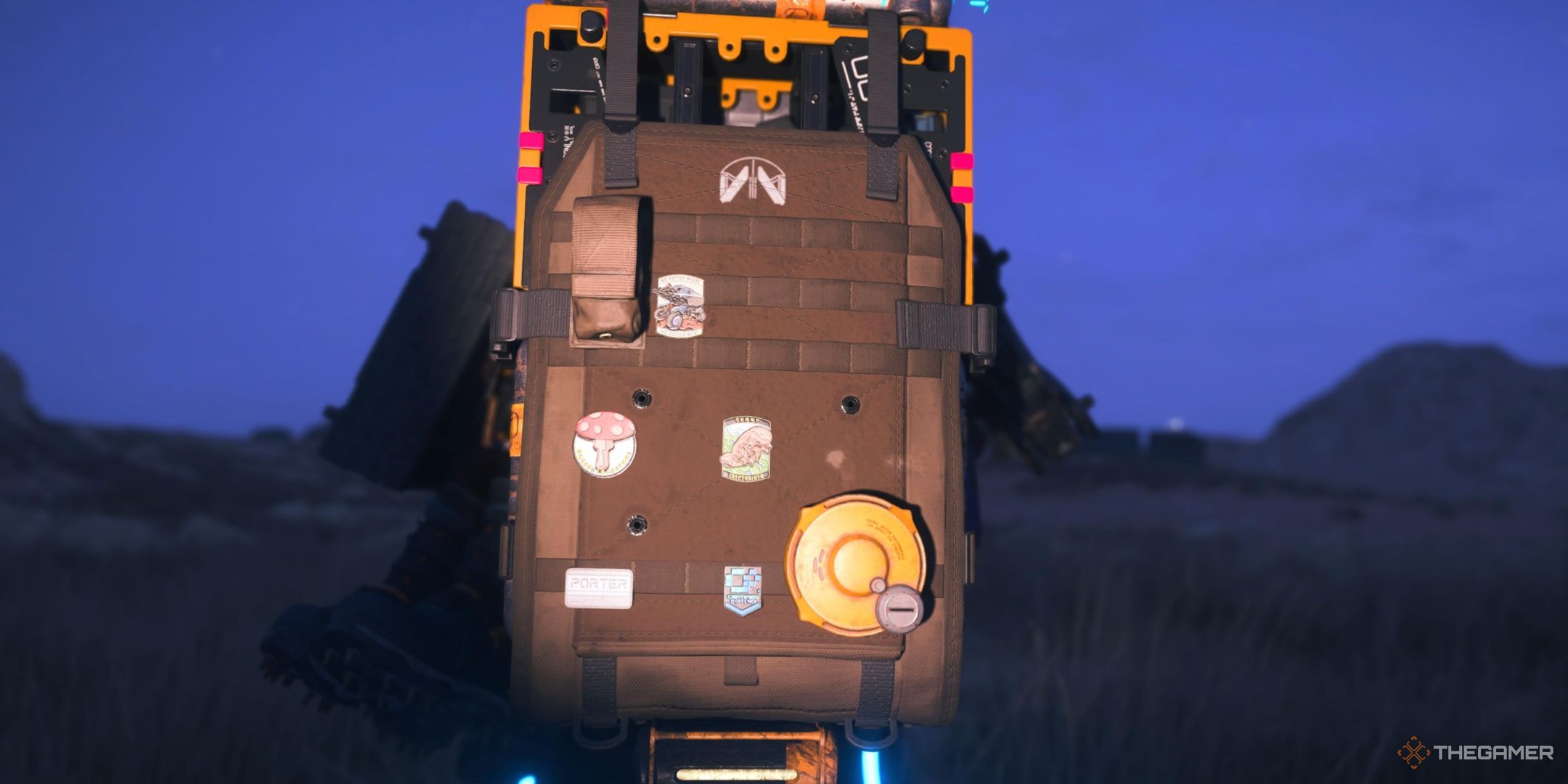
From here, you can change the colour of your backpack, where and what patches are on it, and create new components for it, too. Your backpack does have limited space though, so only put on what you really want to make sure you have the space for everything.
How To Unlock New Backpack Colours

The very first feature of backpack customisation available to you is the ability to change its colour. While this has no impact on your visibility like the camo of Sam’s outfits do, it does still pay to have a nice coloured backpack. It’s what you’ll spend most of the game looking at, after all.
The colour can be changed completely free-of-charge, with no materials or Chiral Crystals needed to do so. There’s only a small selection at the beginning, but each new connection level you make with The Artist prepper will unlock new colours for you to use.
These colours can also be applied to Sam’s outfit, BB’s pod, and Dollman’s suit.
How To Unlock New Backpack Attachments And Accessories

After the colours, there are three other major ways of customising your backpack. These are Patches, Components, and Attachments. Patches are purely aesthetic, and take up very little space on the backpack. Components offer new functions and abilities for both Sam and his backpack, and consequently take up much more space. Accessories dangle from your backpack, and offer a unique, though typically less directly useful, effect.
Each of these are unlocked differently. Here’s how.
Patches

As you might expect from Patches being purely for visuals, there are quite a few of them. All of them are very small, taking up a single spot on the whole backpack. These are unlocked in a variety of different ways, though the vast majority of them come from maxing out your connection level with any prepper. Each prepper has a unique patch for Sam.
When choosing what to put on your backpack, you should absolutely prioritise Components. Patches are more for customising the space that’s left over after putting on all the components you want.
Components

Components are where the backpack really shines in terms of customisation. As you progress through the game, completing main orders and increasing your connection level with preppers, you will unlock even more components to use. These can take up quite a bit of space, so make sure you’re only putting on the ones you need so you’re not over-packing your backpack.
As we advance through the game, this table will be updated with even more of the backpack components.
|
Component |
Effect |
How To Get |
|---|---|---|
|
Back Protector |
Reduces damage from bullets from behind. |
Completer Order No. 9. |
|
Grenade Pouch |
Allows you to hold a single extra grenade per pouch added. |
Complete Order No. 9. |
|
Spare Ammo Container |
Allows Sam to hold some extra ammo for his weapons. Small in size. |
Complete Order No. 9. |
|
Antigravity Device |
Reduces the weight of the backpack, increasing Sam’s max carry weight. |
Connection level 2 with The Government |
|
Large Spare Ammo Container Lv1 |
Allows extra ammo to be held for weapons. |
Connection level 3 with the Government |
|
Large Spare Ammo Container Lv2 |
Allows even more ammo to be held for weapons, and is smaller. |
Connection level 4 with the Government |
|
Electric Shock Absorber |
Transfer energy from being hit by electric weapons to your batteries. |
Connection level 2 with the Western Environmental Observatory |
Most of the components work in a rather unique way. Rather than being one-and-done, they can be increased in strength. The more you equip, the more powerful they are. You can equip all Grenade Pouches if you want, or put multiple Antigravity Devices to make Sam’s cargo light as air. It’s all up to you, and you can change it whenever you want for a very small material cost.
You cannot, however, store backpack components to equip later. If they’re not equipped, they will be automatically recycled for their creation cost after you have completed customising the backpack.
Accessories
Accessories are the rarest items of all, and only one can be equipped to your backpack at a time. These offer brand-new effects unlike any other items you can equip to your backpack. Unlike both Patches and Components, however, they are not crafted.
Instead, all Accessories are given to you by preppers and other characters you meet. For example, the earliest Accessory you are likely to come across is the Porter Accessory. This is given to you by the Bokka back in Mexico once you reach Connection level 4 with him. This allows you to see the location of other NPC porters on the map.
There are plenty others for you to find, either as rewards for completing certain orders, or from the aforementioned preppers with increased Connection levels.

Next
Death Stranding 2: On The Beach – How To Unlock The Happy Birthday Cutscene
I wasn’t expecting Norman Reedus and company to sing me happy birthday in Death Stranding 2, but here we are. Learn how to trigger it.
link